European
Commission
One Europa
Portal
1. Better Regulation
Portal (BRP)
Project Overview
Development of a platform through which the general public can provide feedback on draft acts which either amend or supplement existing laws, or set the conditions for existing laws to be implemented, by the European
Commission (EC) on all member states.
The feedback provided through this platform is taken into account by the EC when further developing the acts and influence the policy-making process of the institution and the lives of all European citizens.
The feedback provided through this platform is taken into account by the EC when further developing the acts and influence the policy-making process of the institution and the lives of all European citizens.
Policy-Making Process Timeline
Based on Stakeholder Input
Based on Stakeholder Input
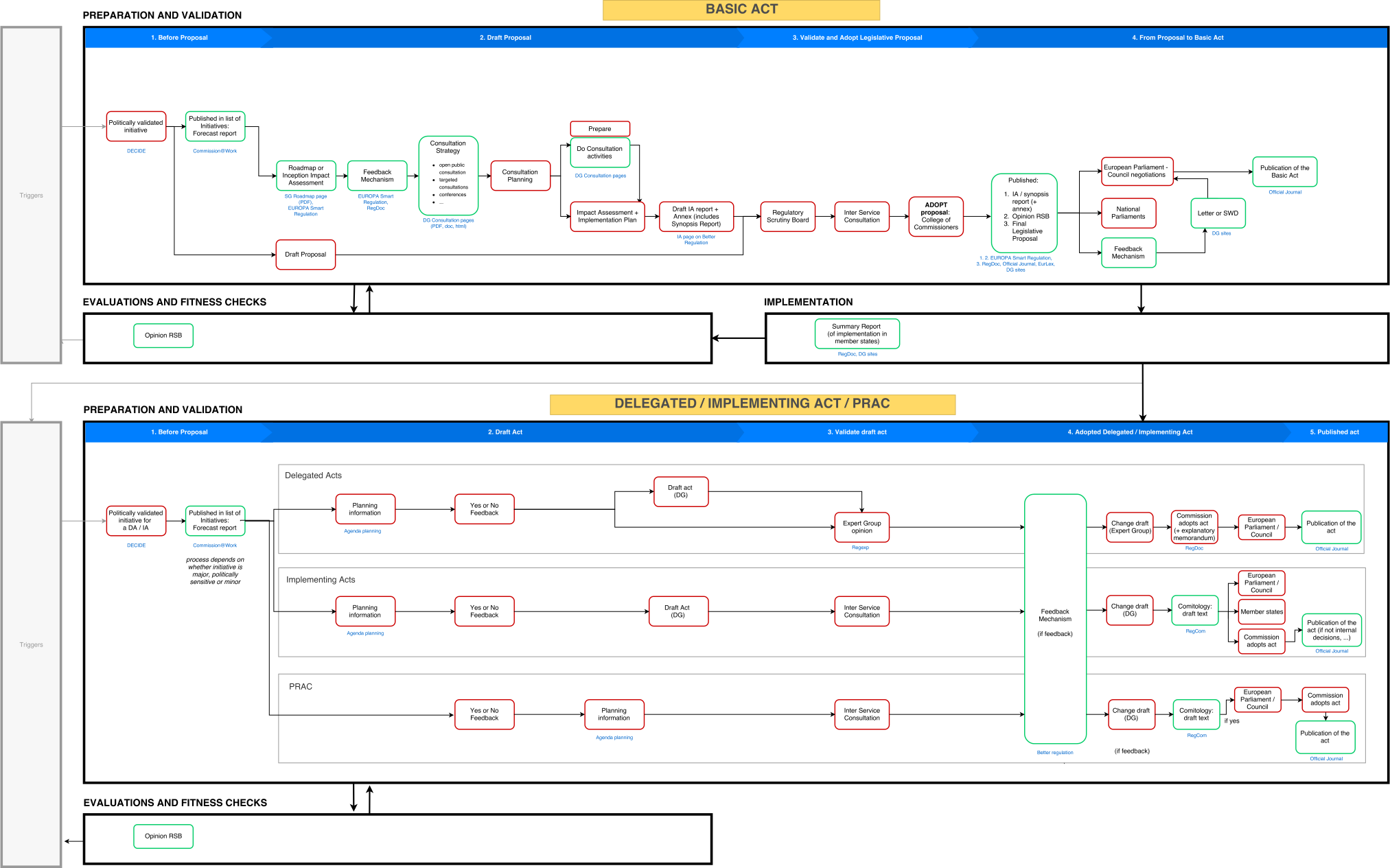
The first stage of the project was to create a timeline visualization of the complete policy-making process.
This allowed us to analyze the main stages for which we would need to provide the users with information, define what shape these should take and identify how to break the process into different phases for which we would need to gather additional input from external users that had previously given feedback to draft acts.
Based on interviews conducted with multiple stakeholders involved in the law making process of the EC we created a diagram that thoroughly describes the main phases that are part of both "Basic Acts" and "Delegated/Implementing Acts".
This allowed us to analyze the main stages for which we would need to provide the users with information, define what shape these should take and identify how to break the process into different phases for which we would need to gather additional input from external users that had previously given feedback to draft acts.
Based on interviews conducted with multiple stakeholders involved in the law making process of the EC we created a diagram that thoroughly describes the main phases that are part of both "Basic Acts" and "Delegated/Implementing Acts".
External User Input
We wanted to get a better understanding of what were the major pain points in the user's current feedback process and for that we conducted 13 interviews were conducted with external users.
Respondents were selected from those who had replied to a previous survey on EU Law and who had opted-in to provide further feedback on future projects developed by the EC. Also they had specified that they had a stake in tracking policy and consultations from a previous, larger EU-wide poll. The user stories (tasks and goals) that were gathered were then scoped according to the different project phases.
The individual interviews were conducted using a set structure of phases that we had previously structured. The results for each 1 hour-long interview were mapped on a user journey diagram while the interviews were conducted. For each journey phase, we asked each participant the same questions.
The interviewees had the following occupations:
Professor of EU Law / Legal Consultant / Physiotherapist / Sr. Product Specialist / Teacher / EC Official / Business Developer for Scientists / IT Specialist / Technical Secretary of International Affairs / Director of Global Indirect Taxes / Professor / Project Manager
The user stories were divided into 6 journey phases:
1. Awareness
How do users realize they can participate to public consultations?
2. Active looking
What makes users decide that they need to look for some public consultations?
3. Deciding
What makes users decide they need or want to part of a specific public consultation?
4. Consuming
How do users share their feedback?
5. Outcome
How do users follow up on the feedback of others?
6. Aſter Use
What are the consequences for the user aſter the public consultation has been closed?
Respondents were selected from those who had replied to a previous survey on EU Law and who had opted-in to provide further feedback on future projects developed by the EC. Also they had specified that they had a stake in tracking policy and consultations from a previous, larger EU-wide poll. The user stories (tasks and goals) that were gathered were then scoped according to the different project phases.
The individual interviews were conducted using a set structure of phases that we had previously structured. The results for each 1 hour-long interview were mapped on a user journey diagram while the interviews were conducted. For each journey phase, we asked each participant the same questions.
The interviewees had the following occupations:
Professor of EU Law / Legal Consultant / Physiotherapist / Sr. Product Specialist / Teacher / EC Official / Business Developer for Scientists / IT Specialist / Technical Secretary of International Affairs / Director of Global Indirect Taxes / Professor / Project Manager
The user stories were divided into 6 journey phases:
1. Awareness
How do users realize they can participate to public consultations?
2. Active looking
What makes users decide that they need to look for some public consultations?
3. Deciding
What makes users decide they need or want to part of a specific public consultation?
4. Consuming
How do users share their feedback?
5. Outcome
How do users follow up on the feedback of others?
6. Aſter Use
What are the consequences for the user aſter the public consultation has been closed?
User Journey
Visualizing the Input Gathered
Visualizing the Input Gathered
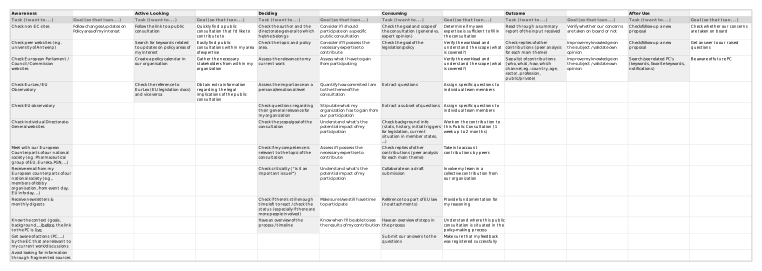
In order to better communicate the input gathered during the user interviews with stakeholders at the Secretariat-General of the EC and to better analyze the key stages of the public consultation process we created a visualization that compiled the feedback in the form of a combined graphical user journey.
This artifact proved to be a crucial reference to start the wireframing process and to focus on the key information that the users would like to visualize in each stage of the process.
This artifact proved to be a crucial reference to start the wireframing process and to focus on the key information that the users would like to visualize in each stage of the process.

Information Architecure
Although we had been treating, up to this point, the BRP as a self-contained entity that could be developed independently of the European Commission's Unified Website it was essential to understand where it would live within the global information architecture
of the platform.
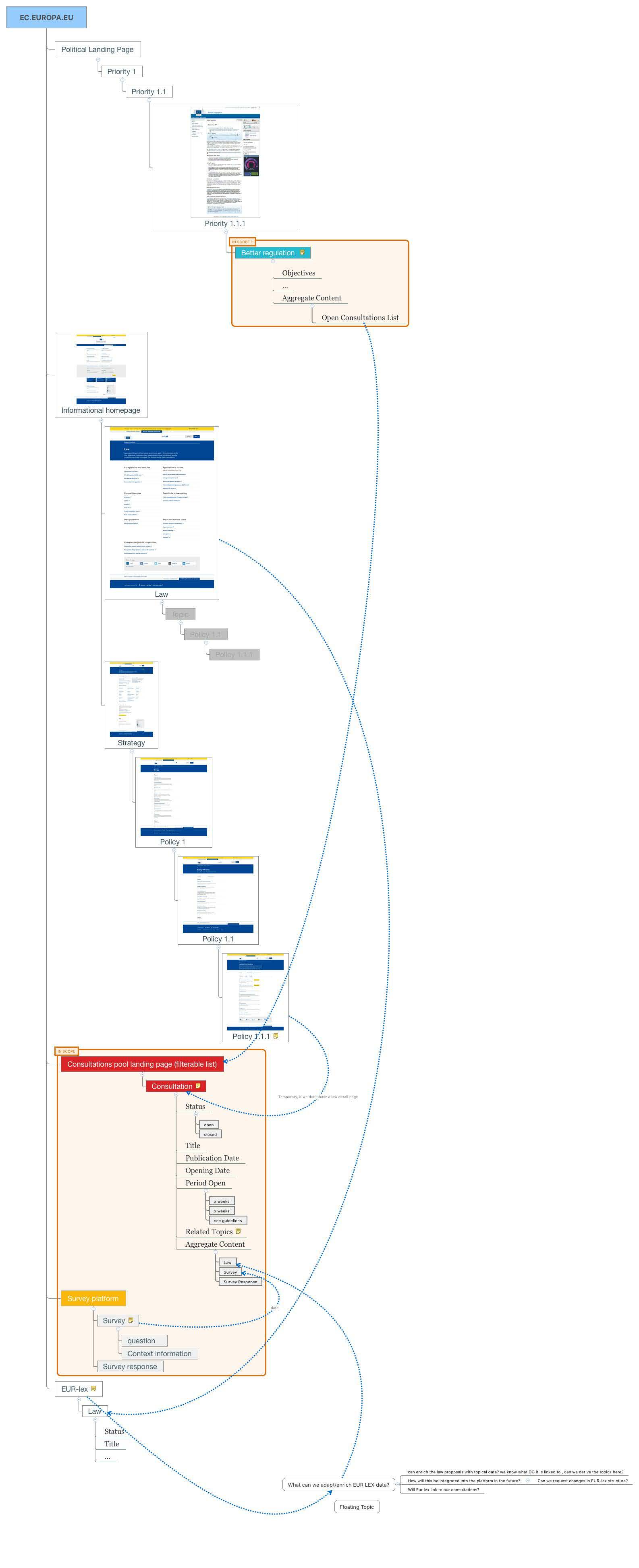
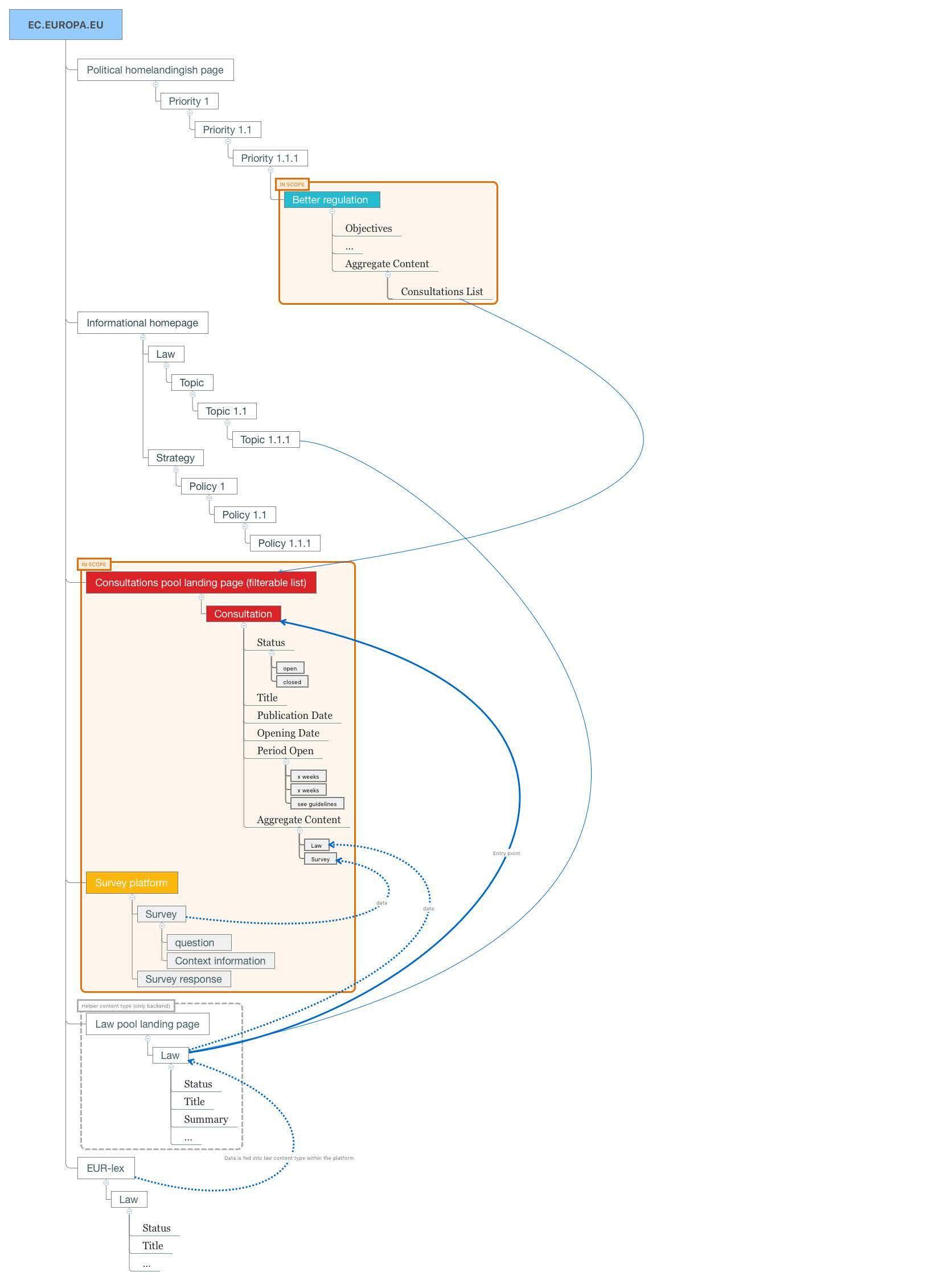
Based on the user tasks survey from which we initially devised the thematic class hierarchy that was the base of the EC's Unified Website structure we concluded that the logical entry points for the BRP would be the "Law" and "Strategy" thematic classes.
Below you can see a detailed mapping of the BRP within the overall structure of the EC's Unified Website and the links between it and specific pages within its parent sections.
Based on the user tasks survey from which we initially devised the thematic class hierarchy that was the base of the EC's Unified Website structure we concluded that the logical entry points for the BRP would be the "Law" and "Strategy" thematic classes.
Below you can see a detailed mapping of the BRP within the overall structure of the EC's Unified Website and the links between it and specific pages within its parent sections.
Ideation & Scoping Workshop
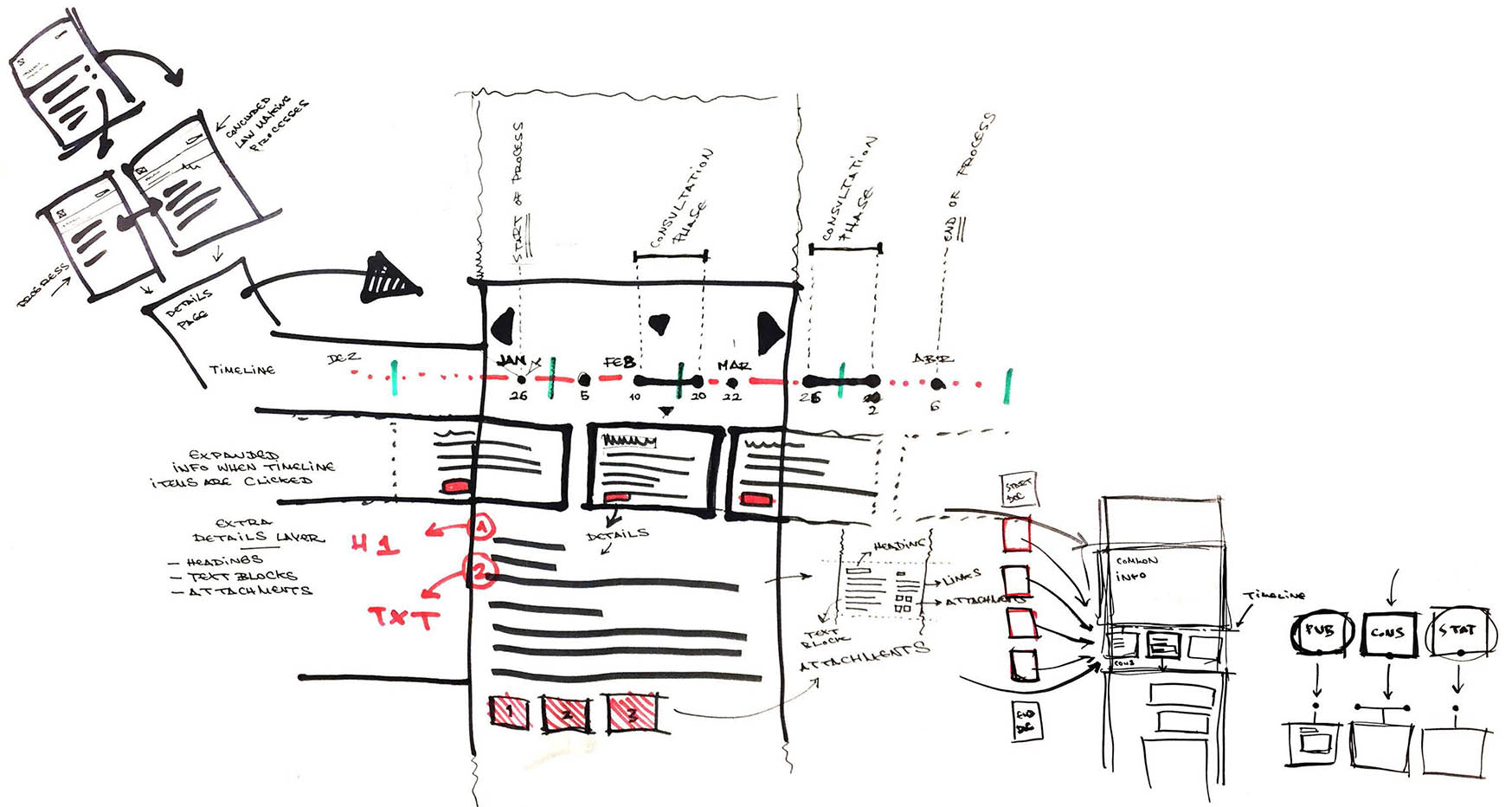
After collecting all the necessary requirements I facilitated an ideation & scoping workshop where we quickly sketched up some of our ideas for the minimum viable product (MVP) of the BRP as well as future iterations of its development.
On the sketch below you can already see the focus on having an overview of the consultation process in the shape of an interactive timeline.
This exercise allowed us to establish the base for the digital wireframes and the subsequent interactive prototype that we developed.
On the sketch below you can already see the focus on having an overview of the consultation process in the shape of an interactive timeline.
This exercise allowed us to establish the base for the digital wireframes and the subsequent interactive prototype that we developed.
Designs
Since we had already a fully developed and mature design system, which I helped to enhance and maintain, we could skip the low fidelity stage altogether.
Using our shared component library we quickly kickstarted the design process and were able to progress from our sketches and work flows to high fidelity prototyping in few weeks.
In order to minimize the development effort necessary to get the MVP in the product I made sure that we used as many existing components as possible to build the several screens that constituted the BRP's page flow.
Interactive prototype available here
Using our shared component library we quickly kickstarted the design process and were able to progress from our sketches and work flows to high fidelity prototyping in few weeks.
In order to minimize the development effort necessary to get the MVP in the product I made sure that we used as many existing components as possible to build the several screens that constituted the BRP's page flow.
Interactive prototype available here
Landing Page
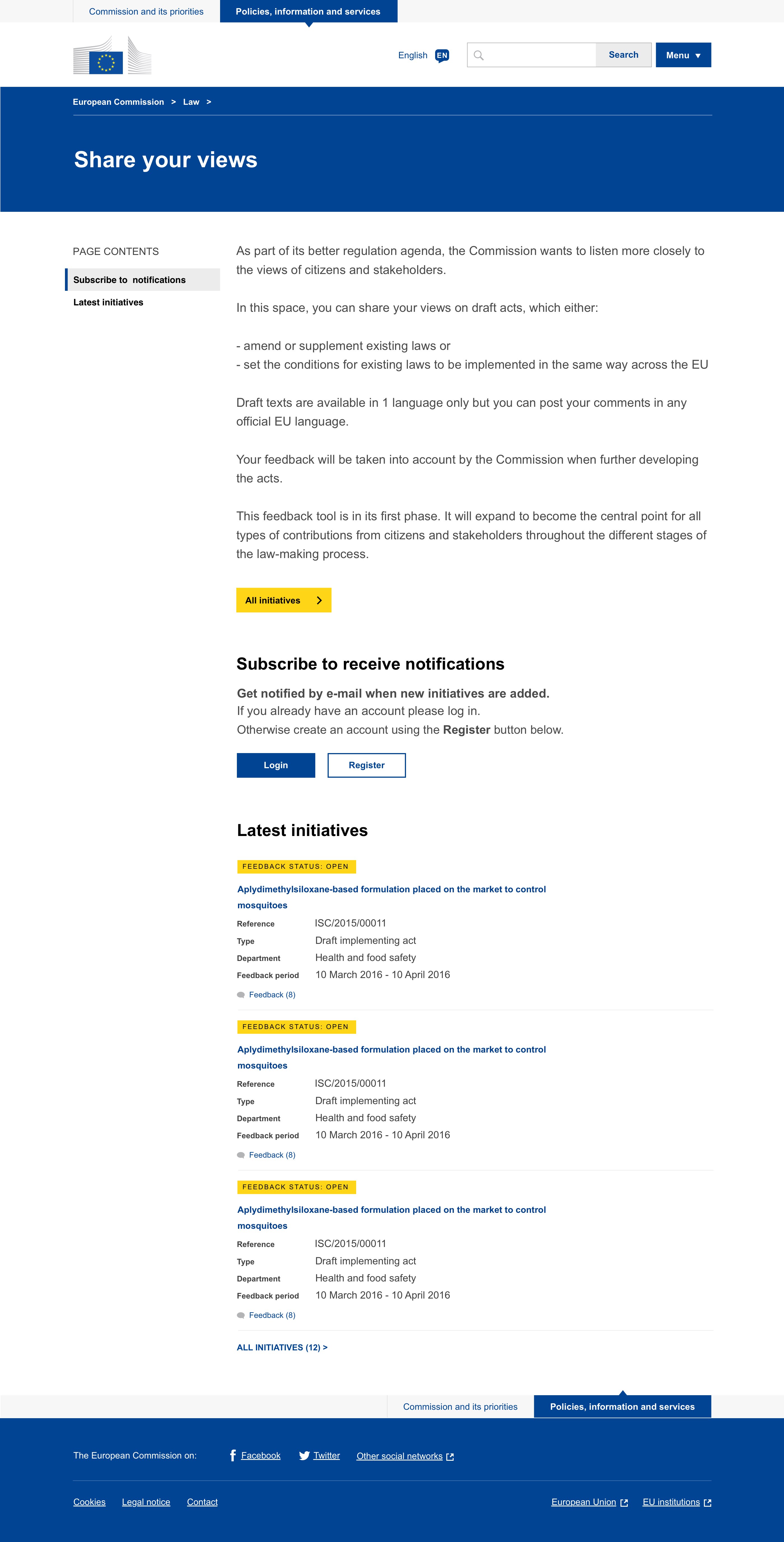
The landing page offers a small summary of the BRP's mission and a Call-to-Action (CTA) link through which the user can quickly navigate to the list view of all available consultations.
Since receiving notifications of upcoming consultations was highly ranked in the user requirements gathered during the interviews it is also highly visible within the page.
Lastly we display some of the initiatives that were recently added to the BRP and which are ready to receive feedback from citizens.
Since receiving notifications of upcoming consultations was highly ranked in the user requirements gathered during the interviews it is also highly visible within the page.
Lastly we display some of the initiatives that were recently added to the BRP and which are ready to receive feedback from citizens.
Consultation Detailed View
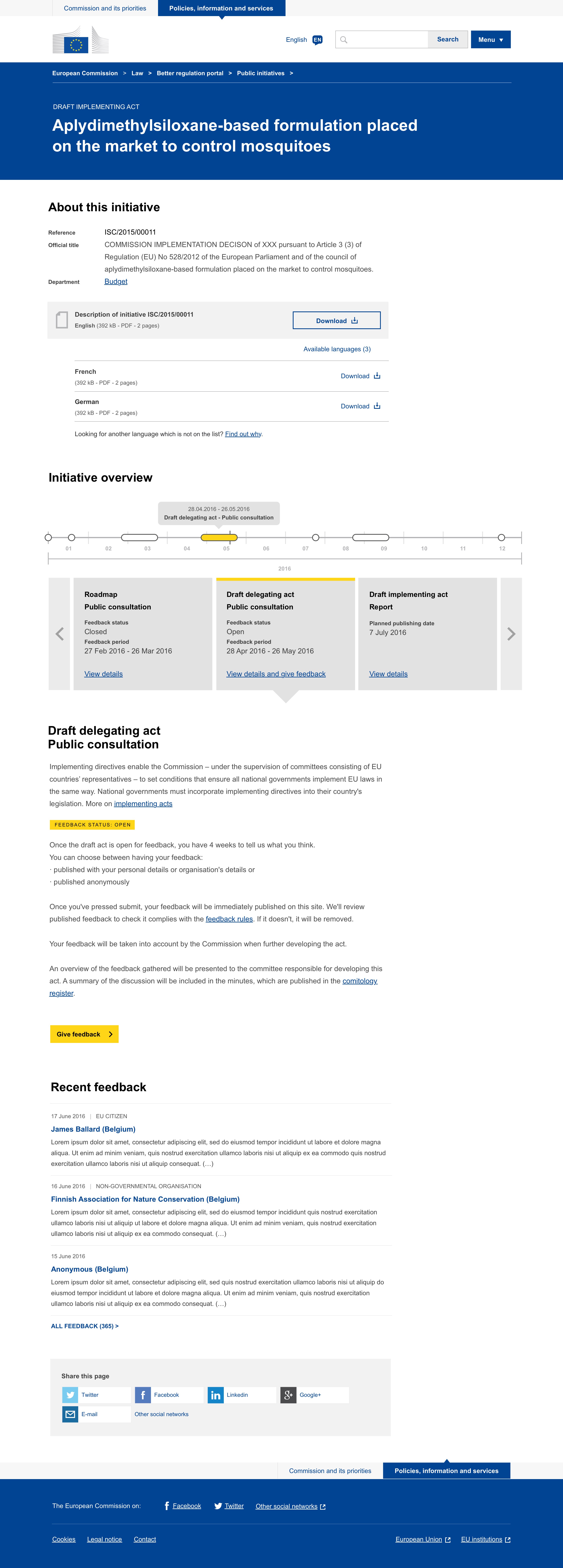
Information like the reference number, the official title and the department that launched the consultation are extremely important for the user as is the ability to download a detailed description of the draft act in multiple
languages.
Through the initiative overview the user can quickly see the different stages of the consultation and when will these occur or access reports of the stages previously completed.
After the user reads through this information and is given more general information about what a draft delegating act is and how the contributions will be gathered and published he can then "Give feedback" through the CTA button.
We also display a list of recent feedback so that the user can quickly browse excerpts of the latest entries or access the full list of feedback.
This is extremely important for transparency reasons and so that the user is aware of how his/her own feedback will be display.
Lastly the user can then share this public consultation through our social media share widget.
Through the initiative overview the user can quickly see the different stages of the consultation and when will these occur or access reports of the stages previously completed.
After the user reads through this information and is given more general information about what a draft delegating act is and how the contributions will be gathered and published he can then "Give feedback" through the CTA button.
We also display a list of recent feedback so that the user can quickly browse excerpts of the latest entries or access the full list of feedback.
This is extremely important for transparency reasons and so that the user is aware of how his/her own feedback will be display.
Lastly the user can then share this public consultation through our social media share widget.
Consultation
List View
List View
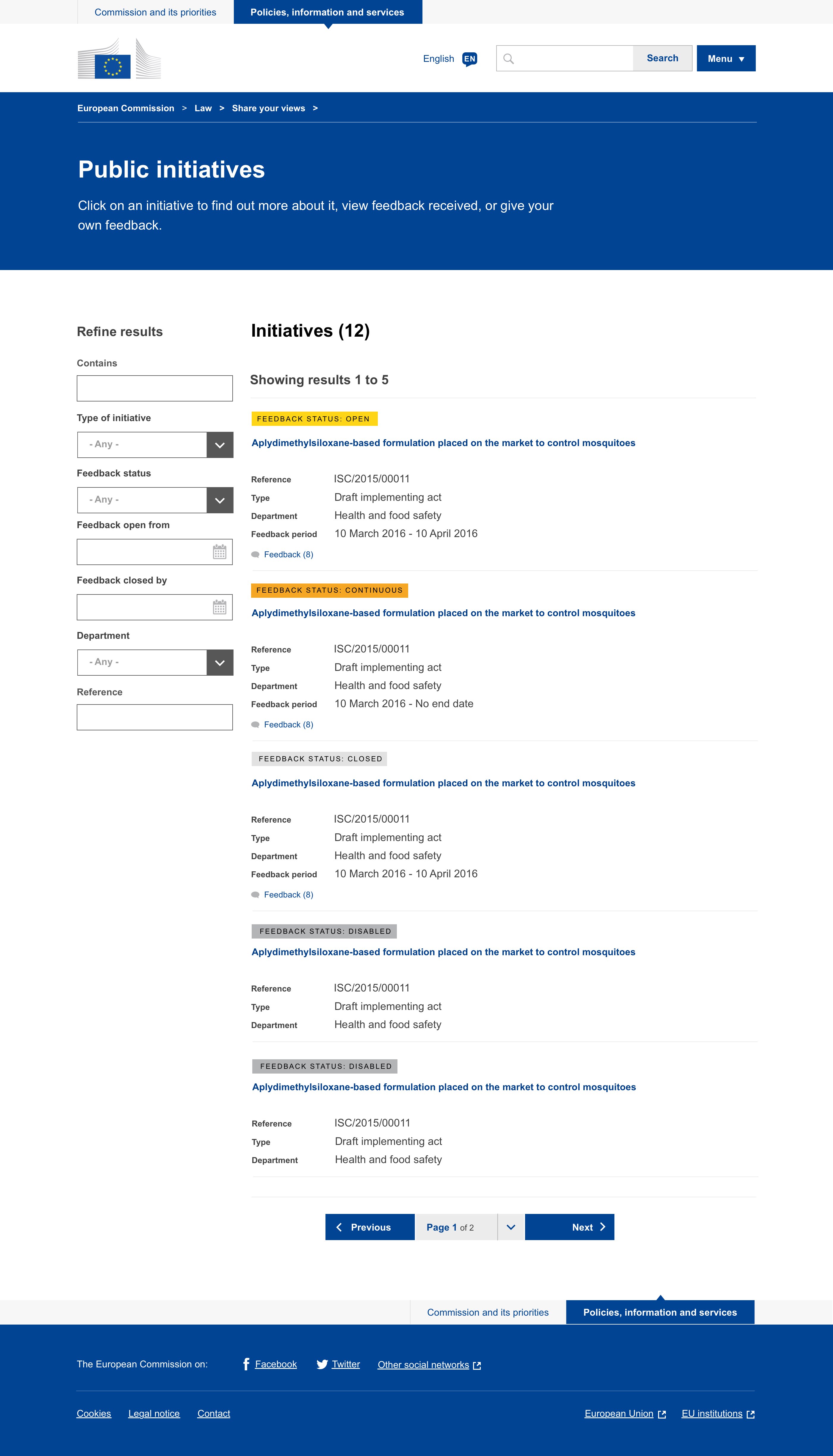
From the Consultation List View the users can quickly view the different Initiatives and are able to sort them by feedback type (Open, Closed, Continuous & Disabled).
Users can also use the additional filters and search box to check for specific terms or narrow down on their areas of interest.
Users can also use the additional filters and search box to check for specific terms or narrow down on their areas of interest.
Feedback List View
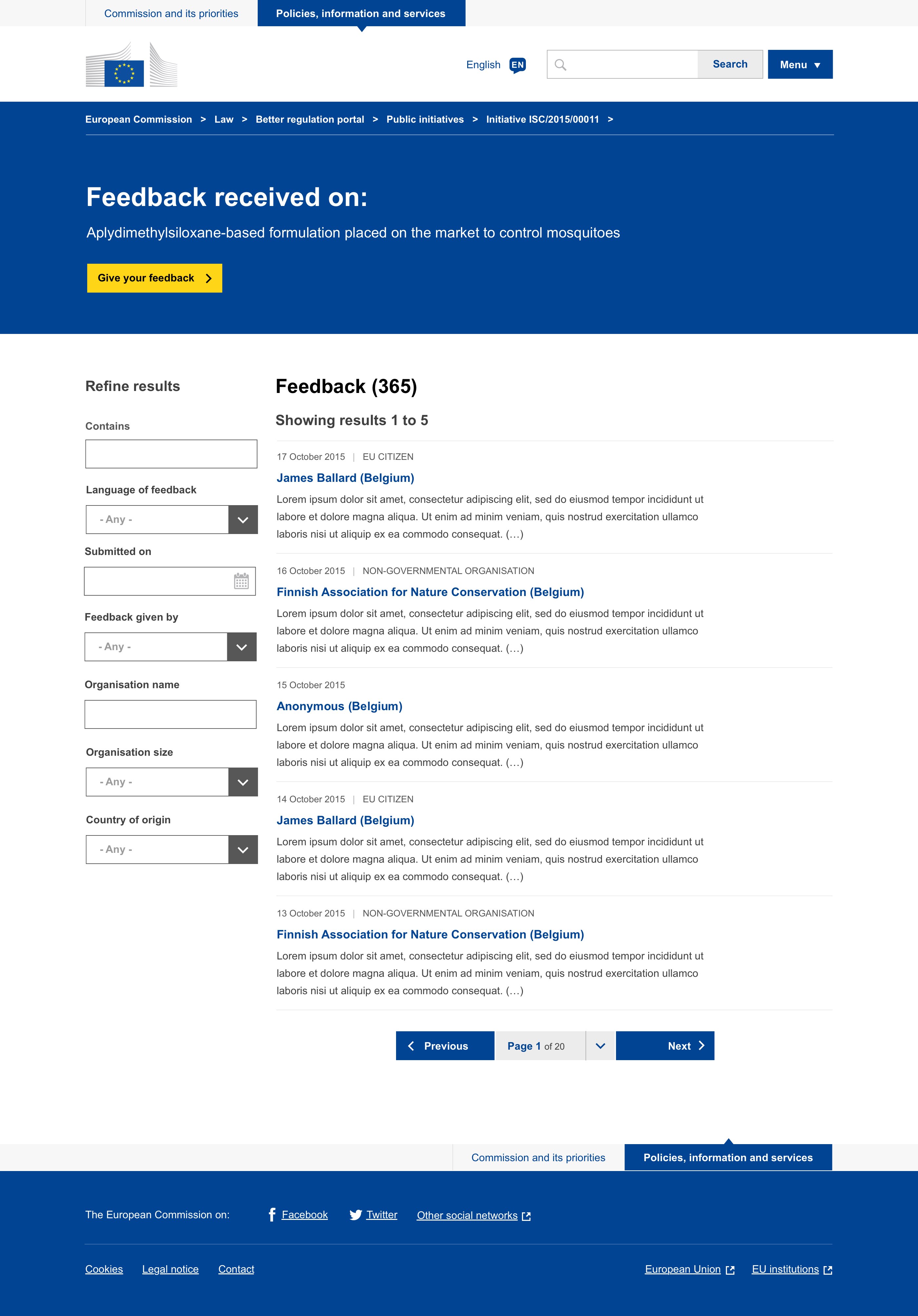
On the Feedback List View users can see the feedback that has already been received for a specific consultation.
They can browse feedback based on the language in which it was written, submission date and details related to the organization or user that wrote them.
They can browse feedback based on the language in which it was written, submission date and details related to the organization or user that wrote them.
2. One Europa
Homepage Redesign
Project Overview
We wanted to merge our Information and our Political websites together to form one single homepage for the European Commission's website. In order to achieve this we ran several ideation workshops and discussed
different proposals presented by the different designers within the team..
Workshops
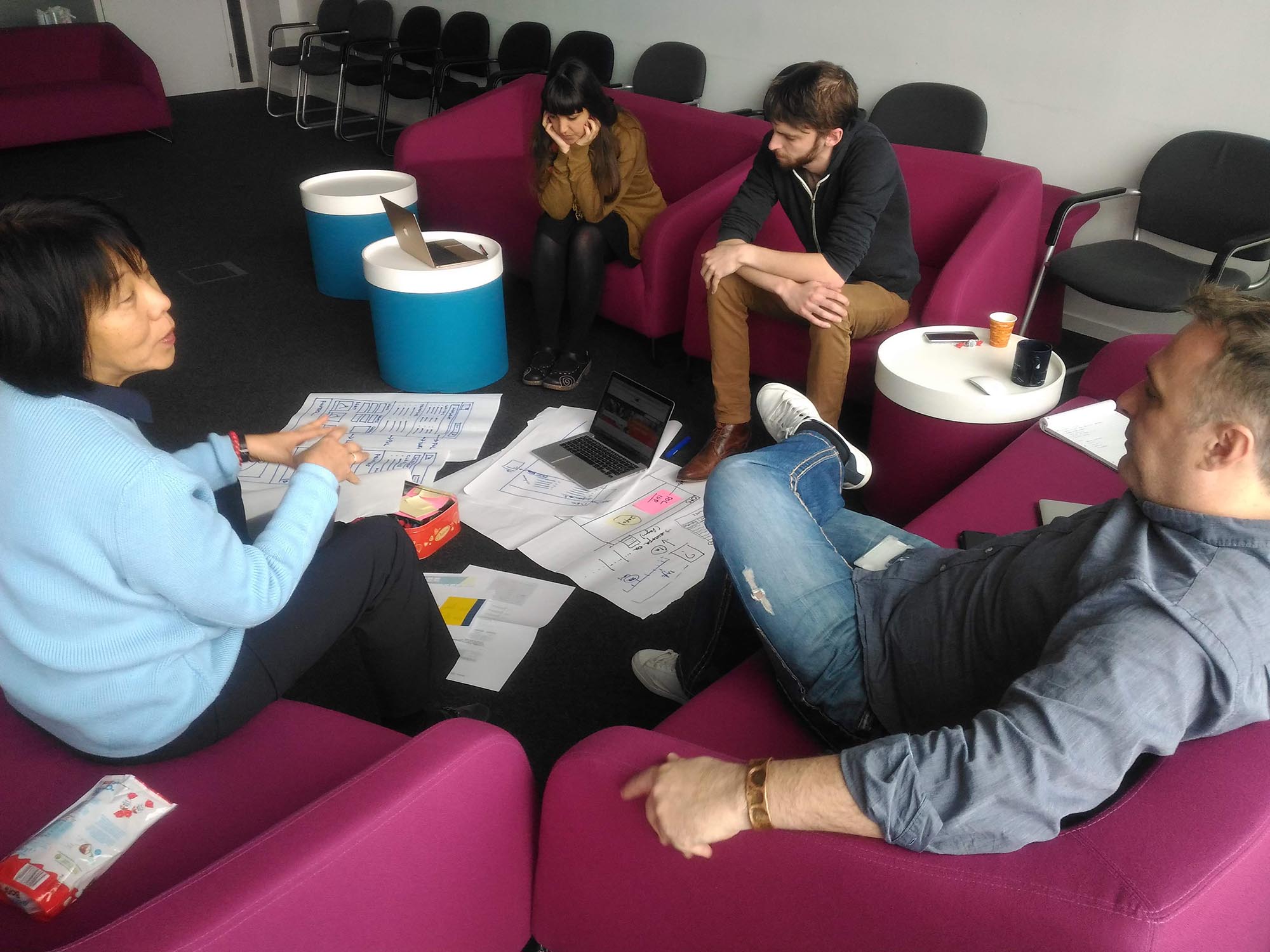
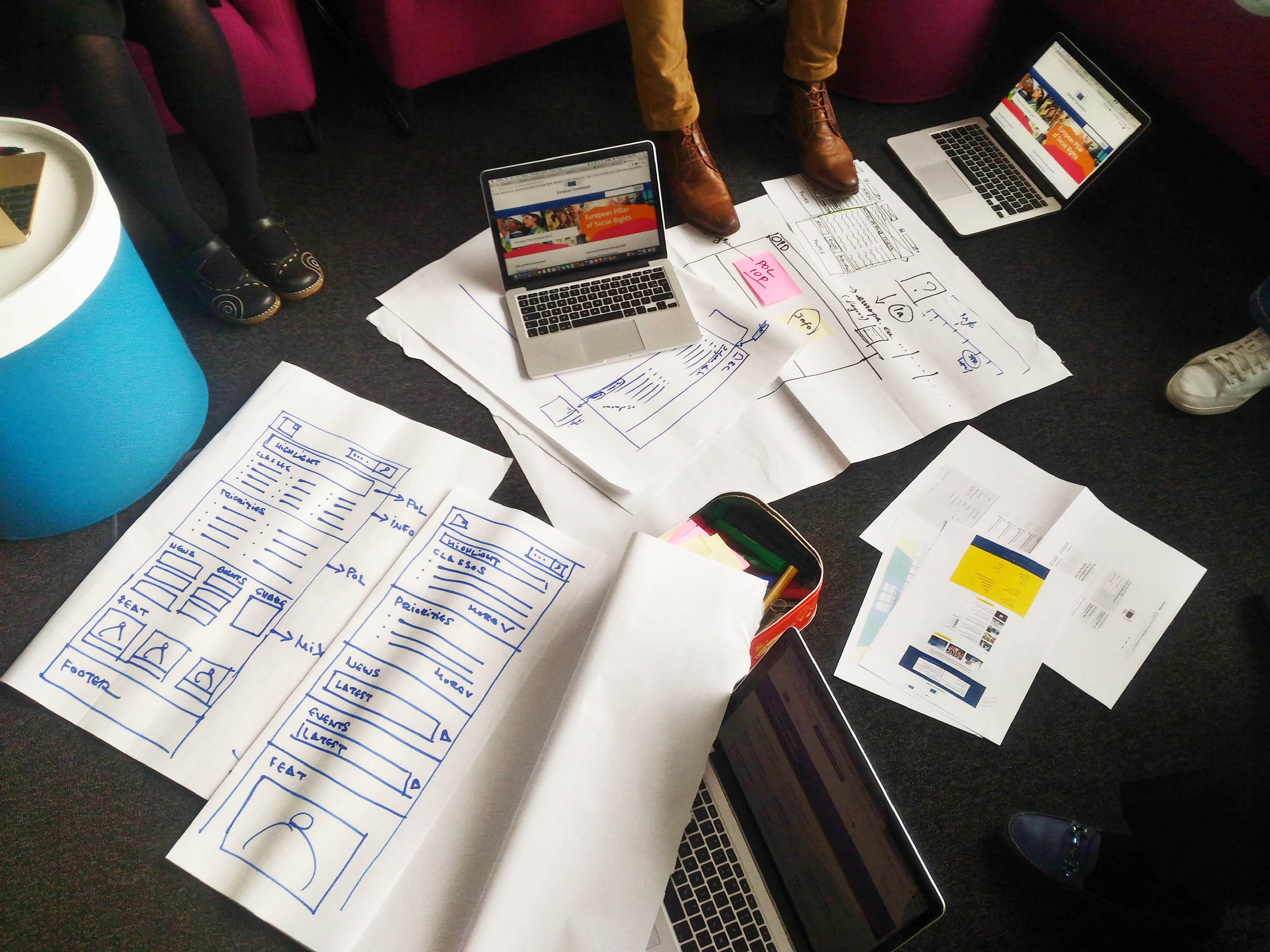
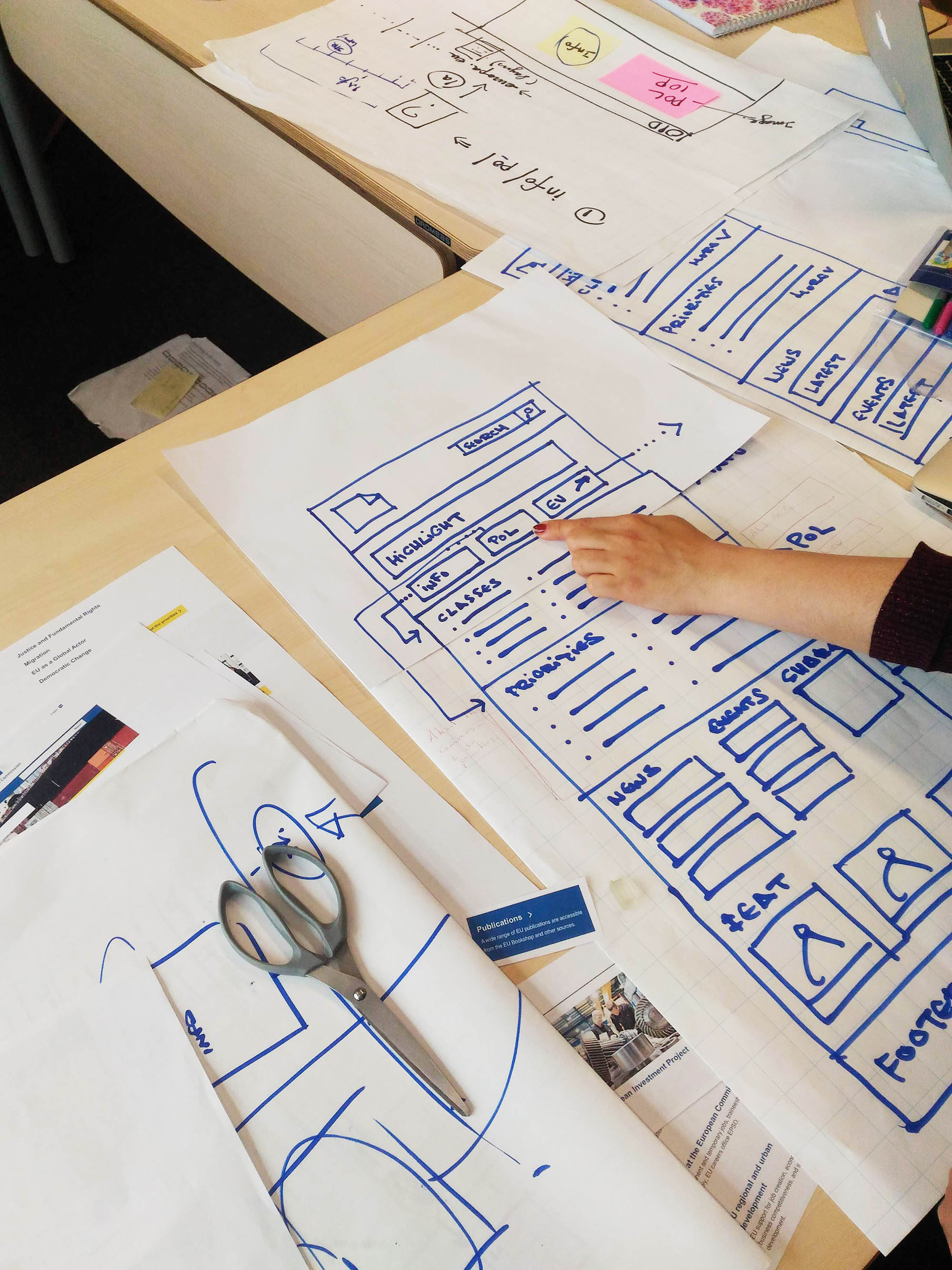
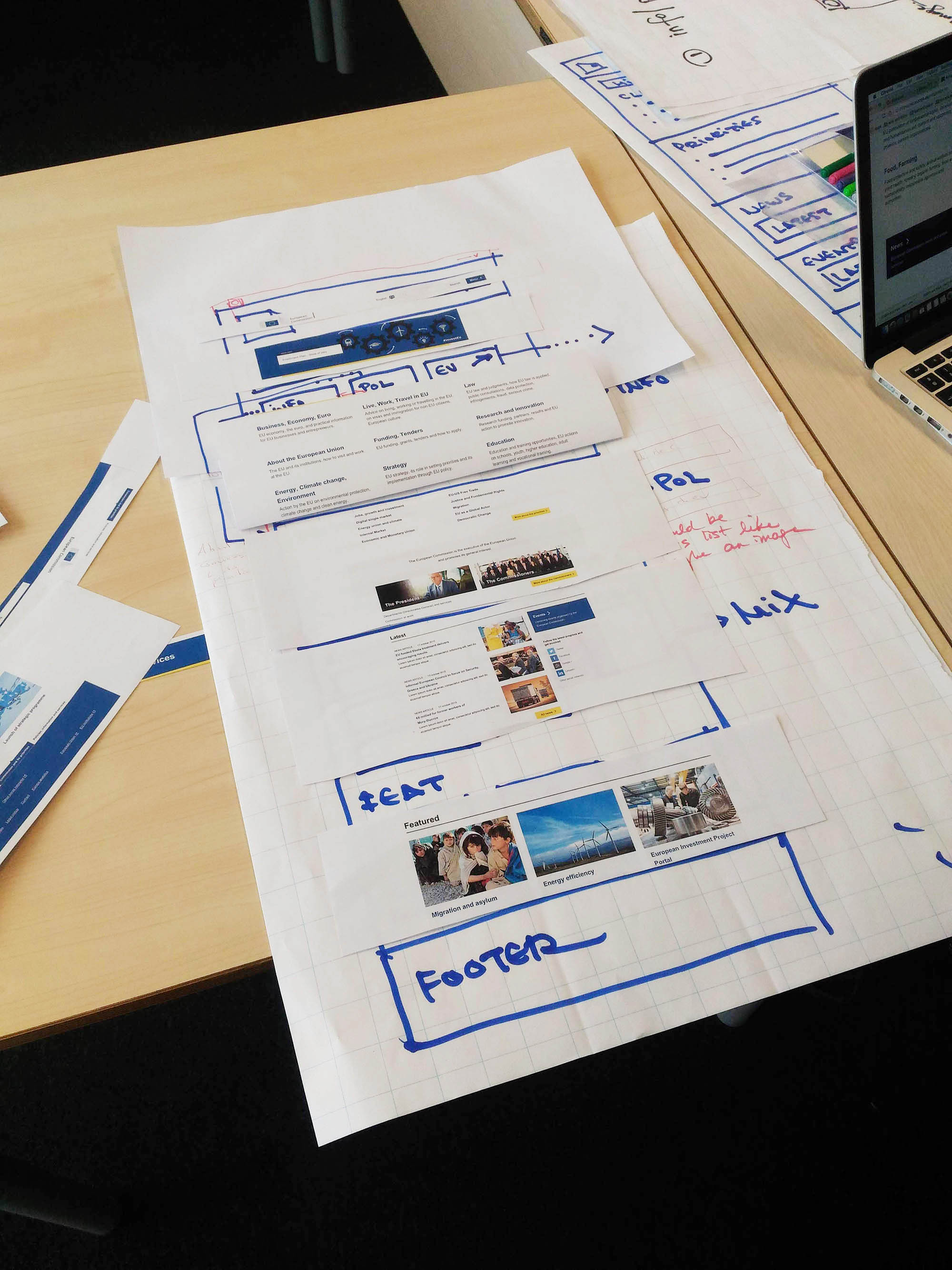
During the workshops we broke down both the Information and the Political website sections into physical blocks that we could quickly shuffle around and discuss what would be the optimal hierarchy of the elements.
This was based on the extensive user research that we had conducted based on what's the information that citizens want to see highlighted on the EC's website as well as the political priorities that the EC wants to communicate.
This was based on the extensive user research that we had conducted based on what's the information that citizens want to see highlighted on the EC's website as well as the political priorities that the EC wants to communicate.
Design
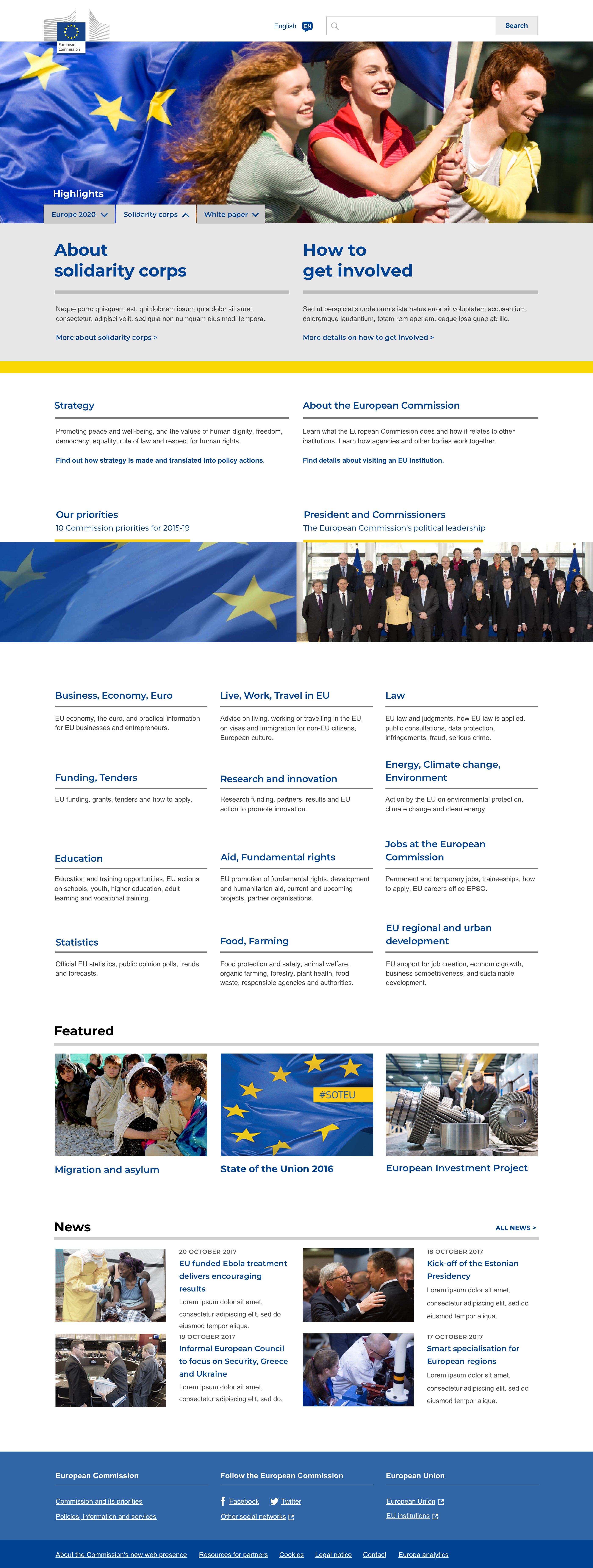
The proposal for the homepage displays three highlights over the header image which can be expanded to provide extra information about ongoing projects that the EC wants the citizens to be aware of and involved in
Underneath that we have the two thematic classes that the users most frequently want to access "Strategy" and "About".
Below we present the Political Priorities and the President and Commissioners which was the topmost information on the Political page.
After that block we display the remaining twelve thematic classes in the order of the importance for the users.
On the bottom of the page we display additional featured projects and a news section.
Underneath that we have the two thematic classes that the users most frequently want to access "Strategy" and "About".
Below we present the Political Priorities and the President and Commissioners which was the topmost information on the Political page.
After that block we display the remaining twelve thematic classes in the order of the importance for the users.
On the bottom of the page we display additional featured projects and a news section.